GenePalette Home


Libraries


New! April 2009 - Preview of GenePalette 2.0
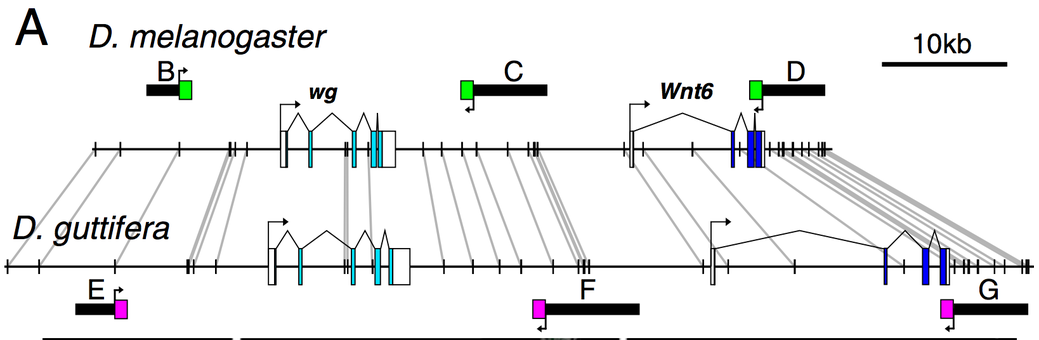
We have made major revisions to the software, incorporating the ability to compare multiple sequences to a reference sequence. Instead of a traditional alignment, the software finds islands of identical DNA, and shows the mapping of these "Anchor Points" between the compared sequences.

DNA comparison demo

Watch the video demonstration of the new sequence comparison features:

Go to the download page to try it out:

Academic User Downlolad   Commercial User Licensing

Click to see past updates


Introduction to GenePalette

GenePalette is a powerful cross-platform and cross-species desktop application for genome sequence visualization and navigation.  Users can download from NCBI’s GenBank database large or small segments of genome sequence from a variety of organisms (e.g., yeast, human, fly, worm, mouse, plants), preserving the gene annotation that is associated with that sequence.  Sequence elements of interest (transcription factor binding sites, other regulatory motifs, restriction enzyme sites, primer sequences, SNPs, microsatellites, etc.) can be searched for and identified in the loaded sequence, and then clearly visualized within a colorful graphical representation of gene organization and intron/exon structure.

The following is a GIF image output from GenePalette displaying binding sites for the transcription factor Suppressor of Hairless [Su(H)] downstream of the Su(H) transcription unit in D. melanogaster:

Here is a link to the GenePalette User's Manual (in PDF format)


Past Updates
New! January, 2006 - GenePalette Version 1.21
Version 1.21 fixes yet more problems with the genbank parser.  If you tried to load a gene, and  the program forced you to select most of the genes  annotated on the sequence, this update will fix the problem. This update will work best if you already have version 1.2 installed. To install the update, follow these instructions

New! November, 2005 - GenePalette Version 1.2
We updated the software to accomodate new changes at GenBank: a problem arose in multiple GenBank files which resultantly forced users to download a much larger section of the sequence than desired (multiple megabases). All of the genome collections on the site are new, and will require v. 1.2 to open. We also added some new features. If you have installed version 1.13, you can update to version 1.2 by following these instructions, however, you will not get our cool new icons (Mac), splash page, and logo (Do a new install to get these new additions).

Newest features include:
  • Fixed GenBank retrieval / Updated genome collections
  • Added a running counter of how much sequence is selected when dragging out a box in the Graphical View
  • Select/Deselect All button added to the Feature Deletion Dialog
  • When searching GenBank, if the first word of your query is found in the gene list, that box is checked in addition to the row being highlighted
  • Fixed a bug related to trimming within introns
  • Fixed some error messages to be more descriptive
  • New Icons(Mac), Splash Page, and Logo
Major accumulated changes since version 1.1:
  • Improved navigation of Graphical View - the View remains focused during scaling
  • Addition of  keyboard accelerators
  • Added the ability to import multiple Features into a Library using a delimited list
  • Select and Deselect buttons added to feature dialogs
  • Users are now notified if a Local sequence is outdated compared to its GenBank equivalent
  • Overall improved speed when interacting with GenBank
  • Added a new Feature representation: the Feature Bar, which allows users to visualize the start and end of a  feature (the bar appears under "Text Symbol" in the Shape combo box)
  • Program now uses Java version 1.4 (interface will have a new appearance)
  • Improved access to local sequences via gene symbol - a catalog of stored gene names is saved from session to session
  • You can now "Hide All" instances of a feature by clicking a check-box in that feature's data panel
  • A mismatch toggle was added to the feature data table for speed and ease of use
  • And much more!

Academic User Downlolad   Commercial User Licensing

Click to see past updates

January, 2005 - GenePalette Version 1.15
We updated the software to fix a problem with GenBank parsing, and also added some new features. If you have version 1.13 installed, you can update to version1.15 by following these instructions. New features include:
  • Fixed GenBank retrieval
  • Save dialogs now display a suggested file name
  • The Menu is now at the top of the screen (MacOSX)
  • When trimming down a sequence, hidden Features remain hidden
  • Many popular commands now have keyboard accelerators
  • When features are added from a library, the most recently used library is automatically highlighted
  • All tables are now Left-justified
  • Increased the size of the mono-space font used for sequence display
  • Added the ability to import multiple features into a Library using a delimited list
  • When adding features from a library, you can Select and Deselect all of the features in the Library
  • You can now "Hide All" instances of a feature by clicking a check-box in that feature's data panel
  • Instead of using a local sequence, users can opt to load the sequence remotely from GenBank (clicking on a checkbox in the sequence selection dialog)
  • Users are now notified if a local sequence is outdated compared to its GenBank equivalent

November, 2004 - GenePalette Version 1.13
We updated the software to fix a problem with GenBank parsing, and also added some new features. To use the new version, you will need to download the new installer and uninstall the old program (use links below). New features include:
  • GenBank parser changed to read a more stable data format
  • Overall improved speed when interacting with GenBank
  • Added a new Feature representation: the Feature Bar, which allows users to visualize the start and end of a  feature (the bar appears under "Text Symbol" in the Shape combo box)
  • When trimming down a sequence, hidden Features remain hidden
  • Program now uses Java version 1.4 (interface will have a new appearance)

July, 2004 - Library Section - get to know your promoters
We have added a page to the website dedicated to sharing Feature Libraries. The first installment is a collection of three libraries that will help you analyze core promoters. Click on Libraries to check it out!

July, 2004 - Article describing GenePalette published
Our paper describing the GenePalette tool was just published in the Genes and Developmental Control section of Developmental Biology. Please cite this article if you use GenePalette in your research:
GenePalette: a universal software tool for genome sequence visualization and analysis.
Rebeiz M, Posakony JW. Dev Biol. 2004 Jul 15;271(2):431-438.
[link to PubMed]

June, 2004 - GenePalette Version 1.11 Released
We have added a few improvements to the program. You can either download a new installer, or update the Java classes in your old installer. Here are the changes made:
  • Updated the GenBank interpreter to meet new standards
  • When changing the scale of the image, the Graphical View remains centered on the last base clicked
  • The catalog of local sequences is now saved from session to session - you don't have to recatalog genes unless you have modified your collection of local sequences
  • A mismatch toggle was added to the feature data table for speed and ease of use.

April, 2004 - GenePalette Quick Reference
To help new users, we have made a four page crash course that briefly introduces  the GenePalette interface.
Check it out:
GenePalette Quick Reference (in PDF format)
 
October, 2003 - Version 1.1 of GenePalette is now available for download
We have added many new features to GenePalette, and optimized the software. Here are some of the biggest changes we made:
  • Increased speed of access to large sequences - mouse and human sequences are accessed 10X faster
  • Gene annotations can be imported from Ensembl using our new GenBank record importer
  • Images can be edited to publication quality in Adobe Illustrator using our new PostScript output options
  • Browse your favorite genome anywhere using our new stored access options on your laptop
  • New clickability functions allow you to traverse the sequence in a heartbeat
  • The layout of the interface was enhanced to accomodate smaller screens
  • And much more!
The new version is available for Windows, Unix/Linux and Mac OSX. Mac OS9 users can still use version 1.04, but isn't this the perfect time to switch? Go to our download page to get your copy today!


You can send questions about GenePalette to mrebeiz@ucsd.edu